


IT ticket triage automation that gets each request to the right team, ready to work.
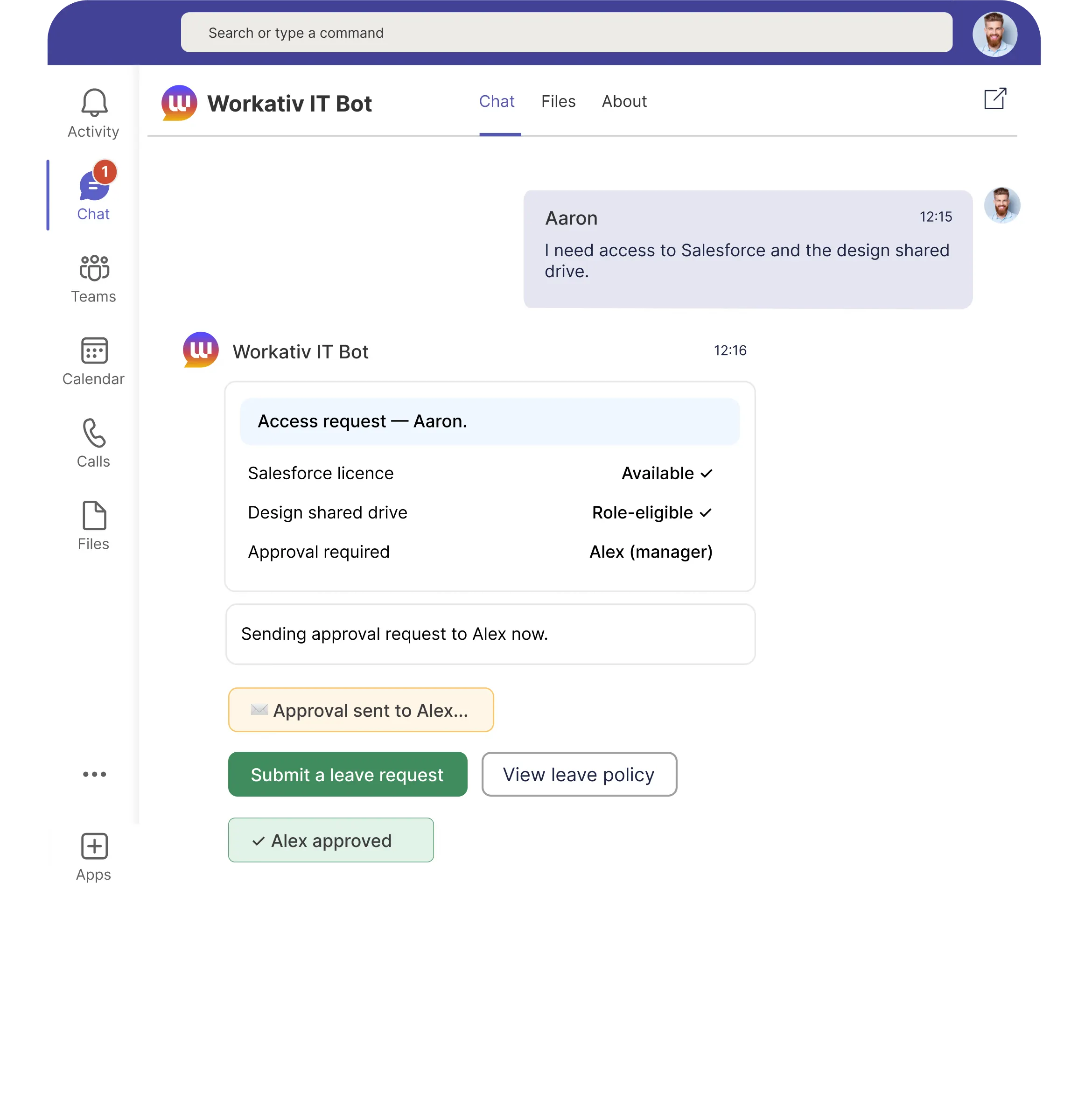
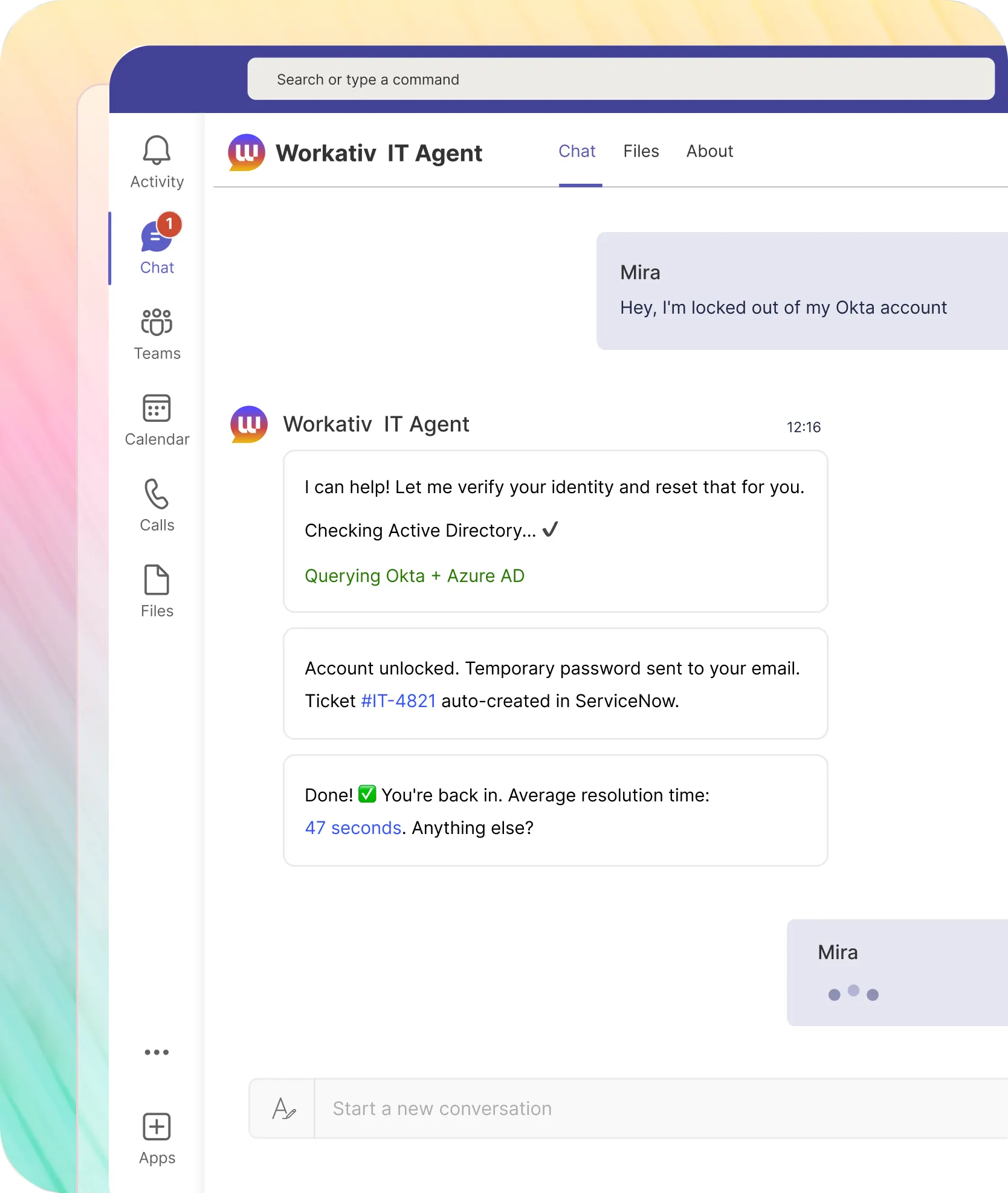
Employees ask in Microsoft Teams or Slack. The AI agent resolves password resets and access requests instantly, and creates tickets for everything else in ServiceNow, Jira or Freshservice with the category, priority and assignment group already set.
IT Teams of all sizes trusts Workativ AI to automate IT Operations & Support

Triage is everything that happens to a ticket before someone starts fixing it.

Classify
Ticket categorization from the employee's own words, matched to your category tree.

Prioritise
Impact and urgency from your matrix, with VIPs and outages weighted.

Route
Intelligent ticket routing to the assignment group your ITSM rules pick.

Resolve or hand off
L0 and L1 requests closed in chat. The rest go to a team with full context.

IT ticket triage automation : is software that reads each incoming IT request, sets the category and priority, and either resolves the request or assigns the ticket to the right team before an analyst sees the queue.
Where manual triage slows the service desk, AI resolves or assigns the ticket instantly.
Most delay in service desk triage happens before the right engineer sees the ticket. Tickets arrive vague, get the wrong category, and move between queues.
Before — Manual triage
Intake
"Laptop not working" arrives by email with no device, no error and no screenshot.
Category
The employee picks "Other", or the analyst guesses from the subject line.
Priority
Everyone marks their ticket as high. Real outages wait behind them.
Assignment
A dispatcher reads the queue and reassigns tickets two or three times.
Repeat reports
Forty tickets for one VPN outage, each triaged by hand.

Details gathered in chat
AI asks for the device, the error and who else is affected before the ticket exists.
Category from your ITSM
AI matches the request to your category tree and service catalogue.
Impact and urgency applied
Priority comes from your matrix, with VIPs and business services weighted the way you set them.
Assignment group set
With the fields filled in, automated ticket routing in your ITSM assigns the ticket the first time.
Linked to one incident
AI links matching reports to one incident and keeps employees updated in chat.
AI resolves the request in chat, or creates the ticket for the right team.
The employee asks in Teams or Slack
"VPN keeps dropping, can't get to the finance share." Emails sent to the IT inbox go to the AI co-worker.
The AI asks for what is missing
Which device, which app, the error message, and whether anyone else has the same problem.
AI resolves L0 and L1 requests instantly
Password resets, account unlocks, access requests and how-to questions are resolved in the chat.
AI creates the triaged ticket
Category, priority and assignment group are set in ServiceNow, Jira or Freshservice. Requests the AI is unsure about go to a triage queue.
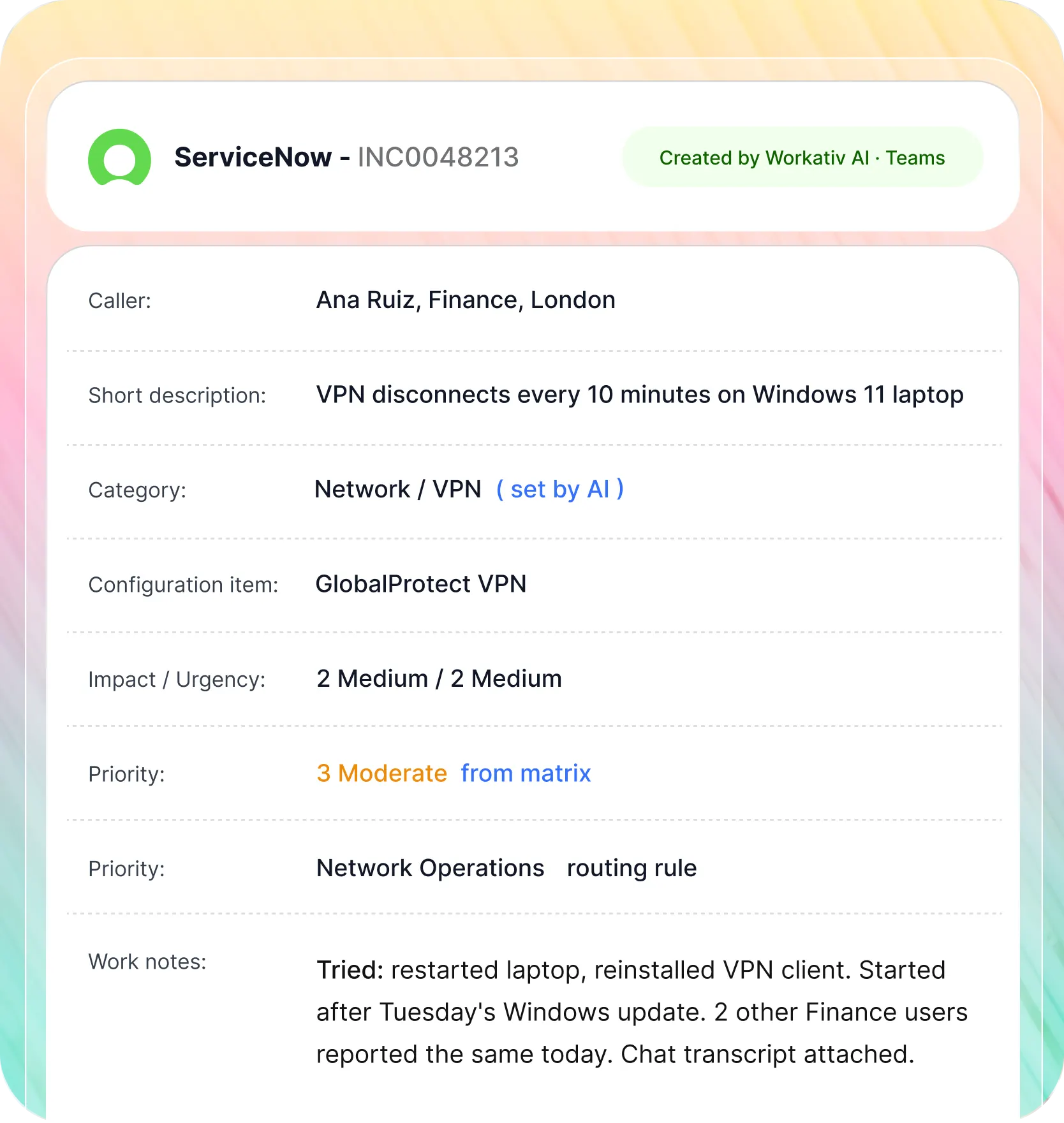
A ServiceNow incident with every triage field filled in.
The employee wrote: "VPN keeps dropping, can't get to the finance share." This is the ticket the network team opens."

A short description in the engineer's terms
Written from the conversation, with the app, the device and the error.
Category and service from your ITSM
The same category tree and service catalogue your team already reports on.
Priority from your matrix
Impact and urgency set separately, so the priority can be checked against your rules.
Transcript and steps already tried
A failed step or a missing device reaches IT with the leaver, the system and the error.
An AI co-worker triages the emails that land in your IT support inbox.
Some requests will always come by email. The AI co-worker reads the shared IT mailbox and turns each email into a triaged ticket.
Reads every new email
Subject, body, attachments and sender, from the IT mailbox in Microsoft 365 or Google Workspace.
Creates the ticket with the fields set
Subject, body, attachments and sender, from the IT mailbox in Microsoft 365 or Google Workspace.
Replies to the sender
The employee gets the ticket number, and a question if a detail such as the device is missing.
Your service desk sets the rules. The AI agent follows them on every ticket.
Triage runs on the categories, matrix and assignment groups you already have in the ITSM.
Routing rules
Assign by category, location, service, business hours or VIP status. Changes in the ITSM apply from the next ticket.
Confidence threshold
Below the threshold you set, the ticket goes to a triage queue with a note on the likely categories.
Outages and major incidents
The AI agent links matching reports to one incident and alerts the assignment group once the count passes your limit.
NMDC's service desk now works on the 22% of tickets that need an engineer.
NMDC Group runs IT support for 13,000 employees in Microsoft Teams. The AI agent resolves routine requests and sends the rest to the right team with the details filled in.
"Workativ has been with us every step of the way. From our first IT support use case to HR, and soon Procurement. The platform grows with us, and so does the team behind it. It's rare to find a solution that's both powerful and genuinely easy to manage."

Imran Abid
IT Operations Leader · NMDC Group

Works with the ITSM, chat and email tools your service desk already runs.


%20--%3e%3csvg%20version='1.1'%20id='Layer_1'%20xmlns='http://www.w3.org/2000/svg'%20xmlns:xlink='http://www.w3.org/1999/xlink'%20x='0px'%20y='0px'%20viewBox='0%200%20512%20512'%20style='enable-background:new%200%200%20512%20512;'%20xml:space='preserve'%3e%3cstyle%20type='text/css'%3e%20.st0{fill:%23F7F7F7;}%20.st1{fill:%2328E4C3;}%20.st2{fill:url(%23SVGID_1_);}%20.st3{fill:url(%23SVGID_2_);}%20%3c/style%3e%3ccircle%20class='st0'%20cx='256'%20cy='256'%20r='245.5'/%3e%3cg%3e%3cg%3e%3cpath%20class='st1'%20d='M304.7,405.6'/%3e%3c/g%3e%3c/g%3e%3cg%3e%3cg%3e%3cpath%20class='st1'%20d='M305.8,353'/%3e%3c/g%3e%3c/g%3e%3clinearGradient%20id='SVGID_1_'%20gradientUnits='userSpaceOnUse'%20x1='388.1461'%20y1='99.0534'%20x2='204.4846'%20y2='204.5899'%20gradientTransform='matrix(1%200%200%20-1%200%20514)'%3e%3cstop%20offset='0.18'%20style='stop-color:%230052CC'/%3e%3cstop%20offset='1'%20style='stop-color:%232684FF'/%3e%3c/linearGradient%3e%3cpath%20class='st2'%20d='M119.9,330.3c-3,4.9-6.4,10.7-9.3,15.3c-2.6,4.4-1.2,10,3.1,12.7l60.7,37.4c4.4,2.7,10.1,1.3,12.9-3%20c0,0,0.1-0.1,0.1-0.1c2.4-4.1,5.6-9.3,9-15c24-39.7,48.2-34.8,91.9-14l60.2,28.6c4.7,2.2,10.2,0.2,12.4-4.4c0-0.1,0.1-0.2,0.1-0.3%20l28.9-65.4c2-4.7,0-10.1-4.7-12.2c-12.7-6-38-17.9-60.7-28.9C242.6,241.2,173.1,243.7,119.9,330.3z'/%3e%3clinearGradient%20id='SVGID_2_'%20gradientUnits='userSpaceOnUse'%20x1='613.0198'%20y1='1773.9866'%20x2='429.3116'%20y2='1879.5697'%20gradientTransform='matrix(-1%200%200%201%20736.83%20-1676.71)'%3e%3cstop%20offset='0.18'%20style='stop-color:%230052CC'/%3e%3cstop%20offset='1'%20style='stop-color:%232684FF'/%3e%3c/linearGradient%3e%3cpath%20class='st3'%20d='M392.1,181.9c3-4.9,6.4-10.7,9.3-15.3c2.6-4.4,1.2-10-3.1-12.7l-60.7-37.4c-4.3-2.9-10.1-1.7-13,2.5%20c-0.1,0.2-0.2,0.4-0.3,0.6c-2.4,4.1-5.6,9.3-9,15c-24,39.7-48.2,34.8-91.9,14l-60-28.5c-4.7-2.2-10.2-0.2-12.4,4.4%20c0,0.1-0.1,0.2-0.1,0.3L122,190.2c-2,4.7,0,10.1,4.7,12.2c12.7,6,38,17.9,60.7,28.9C269.4,271,338.9,268.4,392.1,181.9z'/%3e%3c/svg%3e)



%20--%3e%3csvg%20version='1.1'%20id='Layer_1'%20xmlns='http://www.w3.org/2000/svg'%20xmlns:xlink='http://www.w3.org/1999/xlink'%20x='0px'%20y='0px'%20viewBox='0%200%20512%20512'%20style='enable-background:new%200%200%20512%20512;'%20xml:space='preserve'%3e%3cstyle%20type='text/css'%3e%20.st0{fill:%23EB3C00;}%20.st1{fill:%23FFFFFF;}%20%3c/style%3e%3ccircle%20class='st0'%20cx='256'%20cy='256'%20r='245.5'/%3e%3cpath%20class='st1'%20d='M152.2,332.7v-152L286.7,131l73.1,23.4V359l-73.1,22L152.2,332.7l134.4,16.2V171.9L199,192.4v119.8L152.2,332.7%20z'/%3e%3c/svg%3e)


%20--%3e%3csvg%20version='1.1'%20id='Layer_1'%20xmlns='http://www.w3.org/2000/svg'%20xmlns:xlink='http://www.w3.org/1999/xlink'%20x='0px'%20y='0px'%20viewBox='0%200%20512%20512'%20style='enable-background:new%200%200%20512%20512;'%20xml:space='preserve'%3e%3cstyle%20type='text/css'%3e%20.st0{fill:%230062FF;}%20.st1{fill:%23FFFFFF;}%20%3c/style%3e%3ccircle%20class='st0'%20cx='256'%20cy='256'%20r='245.5'/%3e%3cpath%20class='st1'%20d='M256,162.5l-91,58.2l91,58.2l-91,58.2l-91-59.1l91-58.2l-91-57.3l91-58.2L256,162.5z%20M164.1,355.5l91-58.2%20l91,58.2l-91,58.2L164.1,355.5z%20M256,278.1l91-58.2l-91-57.3l91-58.2l91,58.2l-91,58.2l91,58.2l-91,58.2L256,278.1z'/%3e%3c/svg%3e)


The agent operates within your permission boundaries. Always.
Send every IT request to the right
team, with the details filled in.
See IT ticket triage automation run on your own ITSM categories and assignment groups in a 30-minute demo.
Triage is one part of IT helpdesk automation.
IT helpdesk
IT Helpdesk Automation
L0 requests
Password Reset Automation
L1 requests
Access Provisioning Automation
Frequently asked questions
IT ticket triage automation: frequently asked questions
What is IT ticket triage automation?
IT ticket triage automation is software that reads each incoming IT request, sets the category and priority, and either resolves the request or assigns the ticket to the right team before an analyst sees the queue. Workativ's AI agent triages requests in Microsoft Teams and Slack, and an AI co-worker triages emails sent to the IT inbox. Both create the ticket in ServiceNow, Jira Service Management or Freshservice.
How does AI ticket triage decide the category and priority?
The AI agent reads what the employee wrote, asks a follow-up question when details are missing, and matches the request to the categories already set up in your ITSM. Priority comes from your impact and urgency matrix, using how many people are affected, the service involved and your VIP list.
How is AI ticket triage different from assignment rules in ServiceNow?
Assignment rules in ServiceNow, Jira or Freshservice act on the fields a ticket already has. Employees often leave those fields blank or pick "Other". The AI agent fills in category, priority and service from the conversation first, so your existing assignment rules send the ticket to the right group.
What happens when the AI agent is not sure where a ticket belongs?
You set a confidence threshold. Below it, the AI agent creates the ticket in a triage queue for an analyst to check, with a note on the likely categories. Your team can review analyst corrections and update the triage instructions.
Can the AI co-worker triage emails sent to the IT support inbox?
Yes. The AI co-worker watches the shared IT mailbox in Microsoft 365 or Google Workspace, reads each new email and its attachments, and creates the ticket with category, priority and assignment group. The sender gets a reply with the ticket number and a request for any missing details.
Does the AI agent resolve tickets or only route them?
Both. Password resets, account unlocks, access requests and how-to questions are resolved in the chat. Everything else becomes a ticket for the right team. At NMDC, the AI agent resolves 78% of 6,000 monthly IT tickets.
Which ITSM tools does Workativ ticket triage work with?
ServiceNow, Jira Service Management, Freshservice, BMC Helix, Ivanti, HaloITSM, ManageEngine ServiceDesk Plus and SysAid. The AI agent reads your categories, services and assignment groups from the ITSM, so you keep the structure you already have.
How does the AI agent handle an outage reported by many employees?
When several employees report the same problem within a short window, the AI agent links their reports to one incident and alerts the assignment group. The AI agent tells employees who ask later that the issue is known, and sends updates in the same chat.
Can we keep our existing categories and assignment groups?
Yes. Workativ uses the category tree, services and assignment groups in your ITSM. Changes you make in ServiceNow, Jira or Freshservice apply to triage from the next ticket.
How do we measure ticket triage accuracy?
Track the reassignment rate, the time from request to assignment, and the share of tickets sent to the triage queue. Workativ's analytics show these by category and team, so you can see where routing needs adjusting.
Is employee data safe during ticket triage?
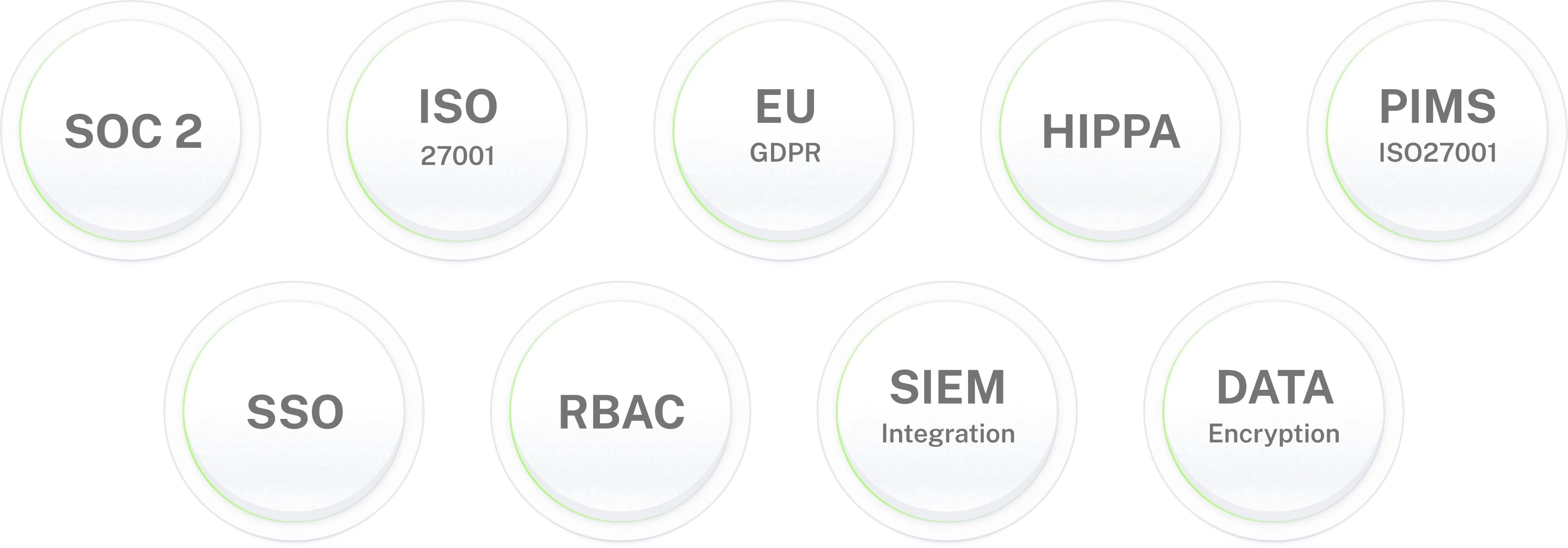
Workativ holds SOC 2 Type II and ISO 27001 certification and meets GDPR and HIPAA requirements. Personal data in chats and emails can be masked before tickets are written, and the AI agent works under the ITSM role you assign.
How quickly can we go live with IT ticket triage automation, and how is Workativ priced?
Most teams go live in 5 to 7 days with pre-built connectors for the ITSM, Microsoft Teams or Slack, and the IT mailbox. Pricing starts at $99 a month and is session-based, with no per-user fees. Start with your highest-volume categories, then add the rest.